
Looking for the best alternatives to the Apple Pencil for your iPad in 2026 without paying three figures?
Although the original Apple accessory is the benchmark, today there is a market of digital pens that offer identical precision and performance at a much more competitive price. After analyzing the most robust and accurate models of the year, we have selected the 5 options that will allow you to write and draw professionally while paying only for the technology, not for the logo.
Logitech Crayon The Indestructible
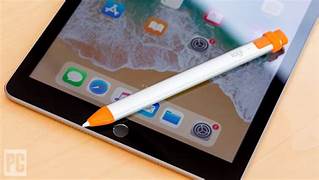
If you're looking for something that will stand up to the daily grind, this is a winner.
Designed with Apple technology, it offers instant connection without the need for Bluetooth pairing.
-
The best: Its ergonomic design prevents it from rolling off the table.
- Logitech Crayon: From 59,99 € (on regular offer) up to 79,95 € (official price).
-
Ideal for: Students and educational environments.
-
Key data: Drop protection up to 1.2 meters.
Adonit Note+
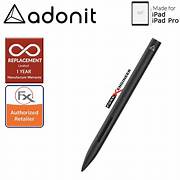
Adonit Note + while other pencils are only for writing, this one understands the intent of your stroke.
-
Actual sensitivityWith 2048 pressure levels, the thickness of the line changes according to the strength of your hand. It is the closest thing to a real brush.
- Adonit Note+: Approximately 89,00 € (although it can be found from 58,37 € depending on the distributor).
-
Natural shadingSupports lateral tilt to create shadows and organic textures in your drawings.
-
Shortcuts in your hand: Includes two programmable physical buttons. Set them to undo or erase without releasing the stylus.
Zag Pro Stylus
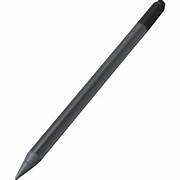
Zagg Pro StylusThe perfect balance between professional performance and smart pricing.
-
Dual tip: Accurate typing on one end and touch navigation on the other.
-
Magnetic charge: It docks and charges directly on the side of the iPad.
-
Sensitive to Tilt: Adjusts the stroke thickness according to the angle of use.
-
Price: Enter 49 € y 79 € (according to generation and offers).
Adonit Dash 4
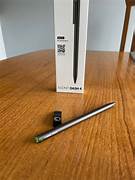
Adonit Dash 4: Total versatility with no hassle to switch between all your devices.
-
Universal compatibility: Works with iPhone, Android and any iPad (no Bluetooth required).
-
Dual mode: Green light for general touchscreens and blue light with Palm Rejection for modern iPads.
-
Magnetic charge: It includes an exclusive USB-C cradle that charges it completely in just 1 hour.
-
Price: It is usually found between 55 € y 65 €.
XP-Pen Note Plus
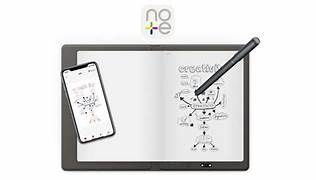
XP-Pen Note Plus: The perfect tool to digitize your ideas from paper to screen.
-
Real digitization: It writes on physical paper with its pen and syncs instantly with your iPad or cell phone.
-
Offline mode: Saves up to 50 pages in its internal memory without the need to be connected.
-
Long Battery Life: It offers up to 16 hours of continuous use on a single magnetic charge.
-
Price: It is usually around 75 € - 95 € (includes smart notebook).
| Model | Highlighted by | Who is it for? |
|---|---|---|
| Logitech Crayon | Resistance | Students and children |
| Adonit Note+ | Pressure and buttons | Drawing and illustration |
| Zagg Pro Stylus | Versatility | Mixed professional use |
| Adonit Dash 4 | Fine tip | Quick note taking |
| XP-Pen Note Plus | Price | Basic sketches |
The best for Estudiantes?
If you just want to take notes and are looking for something that will last for years to come, the Logitech Crayon is your secure purchase.
For art?
If drawing is your thing, don't sacrifice pressure. The Adonit Note+ is the closest thing to the Apple Pencil.
Quality-Price
Maximum performance for the least amount of money: the Zagg Pro Stylus offers premium features at half the price.
Frequently Asked Questions and Buying Guide
They work with almost all models from 2018 onwards. Make sure you have updated your iPad to iOS 12.2 or higher.
Most do not. Models such as the Logitech Crayon work just by turning them on. Only pencils with professional pressure sensitivity such as the Adonit Note+ require activation of Bluetooth.
No. Its soft polymer tips are safe and will not damage glass. For a more realistic feel, but in Data System we recommend using a paper type screen protector.
Yes. All feature palm rejection technology. You can write by resting your hand naturally, just like in a physical notebook.