
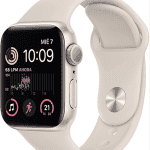
The Apple Watch is much more than just a watch. With its multiple functions, you can customize the face to suit your style and needs. In this article, we show you how to customize the faces of your Apple Watch to maximize its functionality - make your watch more useful and unique!
Why customize the Apple Watch face?
Customizing the face of your Apple Watch is a great way to get the most out of its features. Each watch face allows you to display different types of information. Whether you need to see your steps, the weather or important notifications, customizing it will help you have quick access to everything you need.
In addition, the customization also reflects your personal style, making your watch even more yours.
Selecting the right watch face for your Apple Watch
The first step in customizing your Apple Watch is to choose the dial that best suits your routine. There are many options available, such as:
- ModularIdeal for displaying multiple complications at a glance.
- InfographPerfect for those who want to see a lot of detailed information, such as weather, physical activity, battery and more.
- Activity: Shows your progress in physical activities, ideal for athletes.
Each of these spheres offers something different, so choose the one that best suits your needs.
Adding complications for added functionality
Complications are small features that you can add to the faces of your Apple Watch. They can display data such as battery level, calendar, weather or your reminders. To add a complication, simply tap the watch face, select «Customize» and choose the options you're most interested in.
Adding the right complications allows you to access important information without having to navigate through multiple applications.
How to change the background of your Apple Watch face
The background of the dial is also customizable. You can choose from various colors, images or even use photos from your gallery. Customizing the background gives a unique touch to your Apple Watch and makes it more personal.
In addition, you can adjust the intensity and transparency of the background, making it easier to read the time and complications.
Personalization through apps
If you want to take it a step further, there are many apps available on the App Store that allow you to create custom watch faces. Some apps offer advanced options so you can design a completely unique sphere to suit your style and needs.
Some popular applications include Facer, Watchsmith y Buddywatch. These tools make customizing your Apple Watch faces more fun and creative.
Conclusion
Customizing the faces of your Apple Watch is a great way to maximize its functionality. From choosing the right watch face to adding complications and changing backgrounds, you have many options at your disposal - make your Apple Watch work for you and look amazing at the same time!
With these tips, your Apple Watch will be much more than just a watch - it will be a perfect extension of your style and productivity!
Learn more http://Datasystem.es or in https://repararmac.eu/wp-admin/post.php?post=3661&action=edit