
Disk Utility in macOS: How to keep your Mac in good condition
Disk Utility is a very useful and often unknown tool in macOS. It allows you to manage and repair hard drives, SSDs and other storage devices. It is essential to ensure that your Mac is working properly and that your data is safe.
How to access the disk utility?
To use the disk utility, follow these simple steps:
- Open Finder on your Mac.
- Select Applications in the sidebar.
- Search and select Utilities.
- Click on Disk Utility.
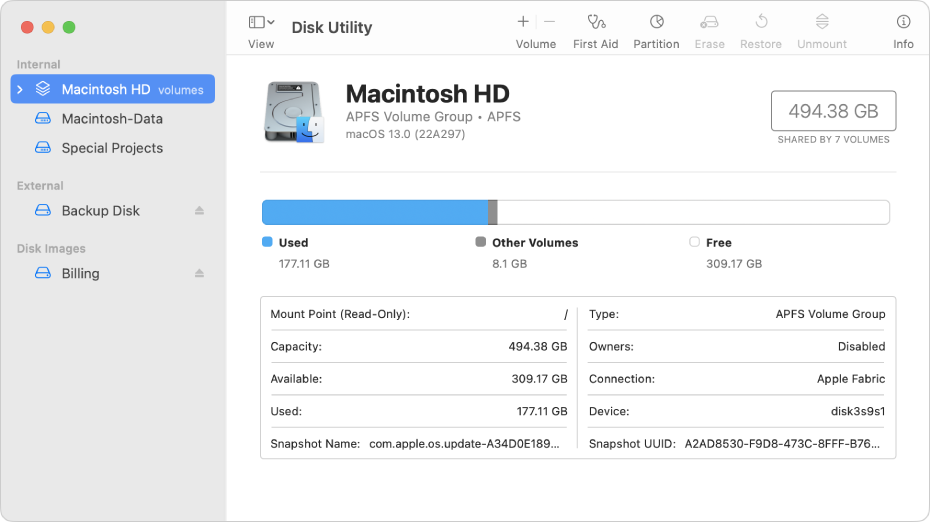
Once opened, you will see a list of your hard drives and storage devices in the left column. From here, you can select any device and start working with it.
Repair and check the health of your disks
The Disk Utility allows you to repair your storage devices. To do this, select the disk and click on First aid at the top of the window. This will fix problems such as bad sectors or system errors.
You can also check the health of your disk. Click the button Verify disk to make sure everything is in order and avoid future problems.
Create and manage partitions
Another important function of the disk utility is the ability to create and manage partitions. Partitions allow you to divide your disk space into several sections. This is useful if you want to install different operating systems or separate your personal files from applications.
To create a partition, select the disk and click on Partition. Follow the instructions to split the disk according to your needs.
Securely erase disks
Disk Utility also allows you to securely erase hard drives. This is ideal if you are selling or giving away your Mac or hard drive. Securely erasing a disk ensures that your data is permanently deleted and cannot be recovered.
To erase a disc, select the disc and click on Delete at the top of the window. Then follow the steps to delete all data permanently.
Conclusion
Disk Utility in macOS is a powerful tool for managing your hard drives, SSDs and other storage devices. With it, you can safely repair, verify, partition and erase disks. Keep your Mac running smoothly and secure your data with this easy-to-use tool.
Our store: https://repararmac.eu/tienda/
Our website: https://repararmac.eu
Learn more in datasystem.com