
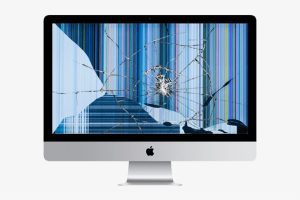
If your iMac is badly broken and not working properly, there are some steps you can take to try to fix the problem. Here are some suggestions that might help you:
Main Solutions:
- Restart your iMac: Sometimes the simplest problems can be solved by simply restarting the system. Turn off your iMac and turn it back on after a few minutes.
- Check the cables and connections: Make sure all cables are properly connected and undamaged. This includes the power cord, cables connecting to other devices, and internal cables inside the iMac, if you have the experience and expertise to open it.
- Update the software: Check to see if updates are available for your iMac's operating system. Updates often fix bugs and known issues.
- Run hardware diagnostics: Apple provides a tool called Apple Diagnostics or Apple Hardware Test, depending on the iMac model you have. These tools allow you to analyze your iMac hardware for potential problems. You can find more information on Apple's support website.
- Reset SMC and NVRAM: The System Management Controller (SMC) and Non-Volatile Random-Access Memory (NVRAM) are important components in an iMac. Resetting them can solve some hardware and software problems. You can find instructions specific to your iMac model on Apple's support website.
- Clean the iMac: Dust and dirt can accumulate inside the iMac and affect its performance. With great care, you can use compressed air or a soft brush to clean the ports, fans and other accessible areas. However, be aware that opening the iMac for deeper cleaning can be messy and may void the warranty.
If after trying these steps your iMac is still not working properly, I would recommend that you contact Apple authorized technical support or take your iMac to a reputable repair store to have it evaluated and the necessary repairs made.
Free tip: Don't turn off your computer until it's completely inoperative, it's easier, better to play it safe, to perform maintenance than to repair a completely inoperative MacBook Air. Leave a message, we will call you back
We are honest service, fair prices and guarantee, see for yourself!
The prices listed on the website are final, with no «awkward» margins.
We always have free diagnostics for any Apple device.
Warranty of 6 months for all modular repairs and 3 months for welding.
iMac repair: what goes wrong most often?
- Macs get hot and noisy.
Dust is the culprit in 99.9% of cases. A year after purchase, no matter how often you work, the iMac will become clogged with dust and start to overheat, breaking all the other components. Cleaning your iMac's cooling system by replacing the thermal paste will only help.
- Hard disk or SSD failure.
The symptoms of failure are simple. The computer begins to freeze frequently, giving errors, working with files slower than normal. Basically, it ceases to be caused by the system.
This is due to overheating and natural wear and tear. The temperature of the hard disk should not exceed 55 degrees Celsius. Its failure can be anticipated much earlier. This is manifested by strange noises, disappearance of some operating system files, random reboots, failures when starting macOS and many software errors when copying or writing files. iMac repair in Moscow is performed in 30 minutes.
- The DVD-CD drive does not read the disc.
The use of disks is not very popular now, but with the development of cloud technology it is getting harder and harder to get them every day. The failure is mainly due to dust contamination.
- The iMac video card needs to be repaired.
It is easy to identify a video chip failure by the following signs: no image, vertical or horizontal bars in the image, artifacts. Intense heat and fan noise. In these cases, only replacing or soldering the video card will do.
- The iMac power supply is in need of repair.
If your iMac won't turn on, or if you smell burning when you turn it on. It is almost impossible to predict such a failure. The cause is power surges, overheating or dust clogging. Soldering or replacing the power supply will solve the problem.
- Screen failure.
If the screen has not been hit or broken, it may still show scratches, streaks, defective pixels and smudges. The solution is to replace the iMac matrix.
Performing iMac repairs is nearly impossible on your own due to the density of the design and lack of tools. You will only make iMac repairs more difficult and expensive if you damage the cables and hit the numerous capacitors inside. We also offer a computer upgrade service. We can add RAM or perform modular component replacement.
How is iMac repair performed in the workshop?
- Take your computer to any service center or call the specialist at home at the address indicated (The specialist will travel anywhere in the capital - free of charge).
- Before any procedure is carried out, a free diagnosis is performed to identify all possible faults and their causes.
- We will inform you of the faults found, the time needed for the rectification and the final price, which already includes all original spare parts and the technician's work (payment deadline).
- Macs are fully repaired and tested.
- We inform you of the preparation and arrange an appointment if the computer has been taken to the workshop.
- Pay for the Mac repair and we will give you a warranty voucher and a club card with a 5% discount.
Our store: https://repararmac.eu/tienda/
Our website: https://repararmac.eu