
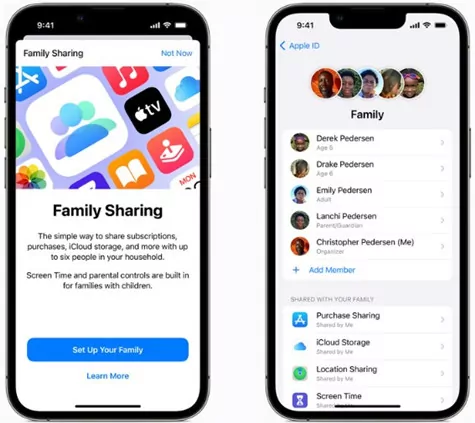
Apple's Family Sharing service allows you to share subscriptions and content with up to six people, giving you access to services such as Apple Music, iCloud+, Apple Arcade, Apple TV+, and App Store purchases. Here's how to set it up and take advantage of it:
1. Set up Family Sharing
- Create a family group:
- Go to Settings on your iPhone, iPad, or Mac.
- Select your name or Apple ID.
- Play As a Family > Configure.
- Follow the guidelines to invite more members using their email addresses or Apple IDs.
- Accept the invitation:
- Each member must accept the invitation from their device.
2. Share Subscriptions
Once the group is set up, you can share compatible subscriptions:
Apple Music
- If you have an Apple Music plan, it will automatically be shared with the members of the group.
- Each user has their own music profile, playlists, and preferences.
iCloud+
- Go to Settings > [Your name] > iCloud > Manage Storage > Share.
- Storage is shared among members, however, each individual has the ability to preserve the security of their files.
Apple TV+ and Apple Arcade
- Access is gained to Settings > As a Family to confirm that they are enabled for sharing.
- Group members may benefit from these services at no additional cost.
Purchases on the App Store and Apple Books
- Enable the option in Settings > [Your name] > As a Family > Share purchases.
- Members can access apps, books, or music purchased by others, with the option to restrict access if there are minors present.
3. Payment Settings
- The organizer is responsible for the primary payment method, but may allow members to use their Apple account balances.
- Go to Settings > As a Family > Share purchases to manage the payment method.
4. Add or Remove Members
- You can add more members from Settings > As a Family > Add member.
- To remove someone, select their name and choose Delete.
Advantages of En Familia
- Financial savings: a single subscription for multiple users.
- Privacy: Each member has their own account and settings.
- Parental control: You can set restrictions for minors.
Learn more http://Datasystem.es or in https://repararmac.eu/wp-admin/post.php?post=3661&action=edit