
Recovery mode is a very useful tool for troubleshooting problems on a Mac.
How to reset a forgotten password or reinstall the operating system. In this article, we will explain how to access the recovery mode and how to use its functions.
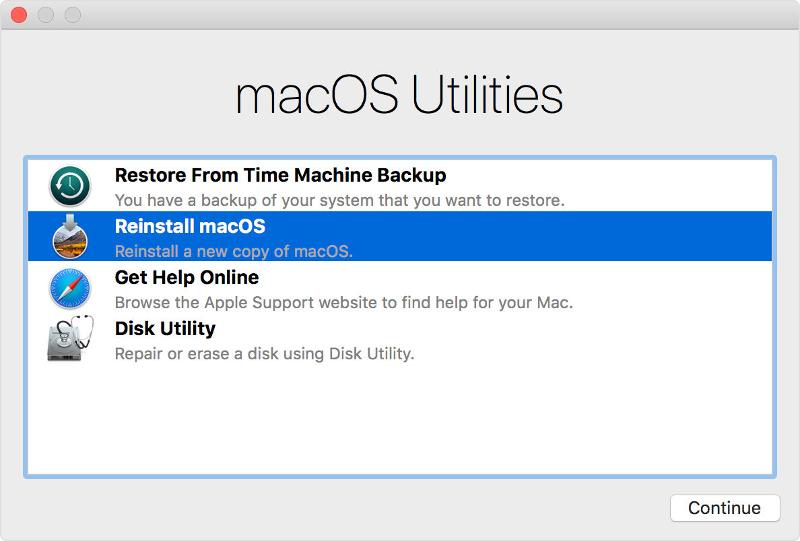
- Accessing recovery mode
- To access recovery mode, turn off your Mac and wait a few seconds before turning it back on.
- As soon as you do so, hold down the Command (⌘) and R keys until the Apple logo or a progress bar appears.
Once you access the recovery mode, you will see a window with several options. Let's take a look at some of the most important ones:
- Using the recovery mode functions
- Restore from a Time Machine backup: If you have a Time Machine backup, you can restore your operating system and all your files and settings from it.
- Reinstall macOS: If you have problems with the operating system, you can reinstall macOS from recovery mode.
- This option downloads a copy of the operating system from Apple's servers and installs a new clean version of the operating system. .
- Recovery mode also includes several disk utility tools, which allow you to repair hard disks.
- Exiting recovery mode Once you have finished using recovery mode, you can exit it by restarting your Mac or by selecting the «Exit recovery mode» option.»
In summary, recovery mode is a useful tool for troubleshooting problems on a Mac.
If you have problems with the operating system or need to perform any maintenance tasks, do not hesitate to use the recovery mode to solve them.
Source: https://it.gadget-info.com/82245-15-totally-awesome-productivity-apps-for-mac
Our store: https://repararmac.eu/tienda/
Our website: https://repararmac.eu